دليل شريحة eSIM: US Google Fi Wireless eSIM Guide: Instant App Activation & Global Roaming
Instant online digital delivery, real US native T-Mobile line, top-tier bank 2FA compatibility, and global high-speed roaming.
⚡ Quick Answer (TL;DR Summary)
Instant online digital delivery, real US native T-Mobile line, top-tier bank 2FA compatibility, and global high-speed roaming.
دليل التثبيت والإعداد خطوة بخطوة
- قم بمسح رمز QR الخاص بشريحة eSIM عبر شبكة Wi-Fi مستقرة أو إدخال عنوان SM-DP+ ورمز التفعيل يدوياً.
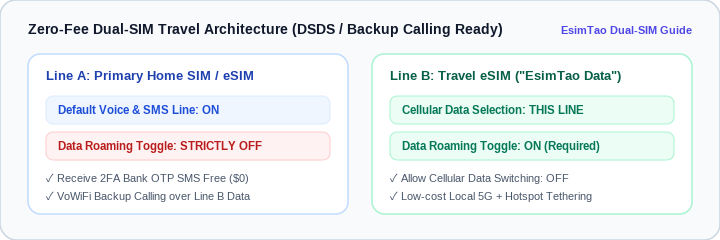
- قم بتسمية شريحتك الأساسية وشريحة السفر (eSIM) لتجنب رسوم التجوال غير المقصودة.
- عند الوصول إلى وجهتك، قم بتفعيل تجوال البيانات (Data Roaming) وتأكد من صحة إعدادات APN.
- في حال عدم وجود تغطية، جرب البحث اليدوي عن الشبكة أو تشغيل وضع الطيران وإيقافه.
نصائح هامة وأفضل الممارسات
- لا تقم بحذف ملف تعريف eSIM أثناء الاستخدام أو قبل السفر لأن رمز QR لن يعمل مرة أخرى.
- قم بإيقاف تشغيل "السماح بالتبديل بين البيانات الخلوية" لتجنب أي رسوم غير متوقعة من شريحتك الأساسية.
The 90-Day Overseas Roaming Rule & Data Pause Mechanics
- Terms of Service Policy: Google Fi is designed primarily for US residents. If a subscriber roams outside the US continuously for more than 90 days, mobile cellular data roaming is automatically paused.
- Uninterrupted Voice & 2FA SMS: Even after international data is suspended, voice calling, Wi-Fi Calling, and incoming two-factor authentication (2FA) SMS continue to function globally at no additional cost.
- Data Restoration: Reconnecting to native US cell towers for several consecutive days automatically restores full international data roaming privileges.
Free Data-Only SIMs & Multi-Device Synergy
- Up to 4 Free Data SIMs: Unlimited Plus subscribers can order up to four physical or digital data-only SIMs for iPads, laptops, or secondary devices at zero extra monthly subscription cost.
- Shared High-Speed Data Pool: Data SIMs draw directly from the primary 50GB bucket with full global roaming capabilities across 200+ countries.
- Pristine US IP Geolocation: All international traffic routes through Google private backbone servers, presenting authentic US residential/mobile IPs ideal for banking and secure services.
Digital eSIM Activation & iPhone Setup Steps
- Install the Google Fi app via the US App Store or Google Play Store.
- Sign in with your Google account and select your plan; the app automatically provisions and downloads the eSIM to your device.
- On iPhone, manually verify Cellular Data APN is set to "h2g2" and MMS APN to "h2g2".
- Enable "Wi-Fi Calling" to ensure free incoming calls and messages worldwide.
5. Benchmark Comparison: Global Keep-Alive eSIM Cards Matrix
| eSIM / Carrier | Country Code | Keep-Alive Mechanism | Monthly Fee | KYC Rule |
|---|---|---|---|---|
| US Tello Mobile | United States (+1) | $5/month minimum active plan with native Wi-Fi Calling | $5.00 / month | Digital Payment Validation |
| US Ultra Mobile PayGo | United States (+1) | $3/month ($36/year) automatic renewal with 100 free SMS/min via Wi-Fi Calling | $3.00 / month | US Address Registration |
| Hong Kong 3HK (DIY / SoSIM) | Hong Kong (+852) | Annual travel pack purchase or HK$50 top-up (365 days) | Zero monthly fee (Prepaid) | HK Real-Name Statutory |
Frequently Asked Questions (FAQ)
Q: هل يمكن مسح وتثبيت نفس رمز QR على أكثر من جهاز؟
A: لا، معظم شرائح eSIM صالحة للاستخدام لمرة واحدة فقط (Single-Use). لا تحذفها من جهازك.
Q: كيف يمكن استخدام eSIM على أجهزة لا تدعمها مدمجاً؟
A: يمكنك استخدام محولات الشرائح الذكية مثل (ESTK أو 5ber) لكتابة ملفات تعريف eSIM على شريحة فعلية.
Q: How does the Google Fi Group Plan reduce costs?
A: On the Unlimited Plus plan, the monthly price drops from $65 for a single line to $40 per line for groups of 4 to 6 members, with each person receiving an independent 50GB high-speed data pool.
Q: Are there any feature limitations when using Google Fi on iPhone?
A: Modern iPhones on iOS 16.4+ fully support 5G, Personal Hotspot, and Wi-Fi Calling. However, dynamic network switching between multiple carrier backbones is exclusive to Pixel handsets.
Q: How do I transfer Google Fi eSIM to a new phone?
A: Simply download the Google Fi app on the new handset, sign in, and tap "Transfer service" to provision the eSIM instantly.