eSIM-Guide: Australia ALDI Mobile eSIM Guide: Strong WFC & Long Validity
Aussie ALDI Mobile guide, WFC capable, keep receiving SMS even after plan expiry.
⚡ Quick Answer (TL;DR Summary)
Aussie ALDI Mobile guide, WFC capable, keep receiving SMS even after plan expiry.
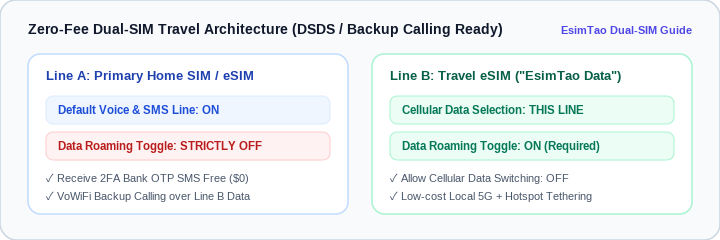
Schritt-für-Schritt-Installation und Setup
- Scan the eSIM QR code on a stable Wi-Fi connection, or manually enter the SM-DP+ Address and Activation Code.
- Label your primary SIM and travel eSIM clearly to prevent accidental roaming data charges.
- Upon arrival at your destination, turn on Data Roaming on the travel eSIM and verify APN settings.
- If encountering no service or 3G only, toggle Airplane Mode or manually select an authorized roaming carrier network.
Wichtige Tipps und Optimierung
- Never delete the eSIM profile during travel; once deleted, the QR code cannot be scanned again.
- Disable "Allow Cellular Data Switching" to guarantee your primary carrier cannot incur roaming charges.
Global Wi-Fi Calling (WFC) Experience & Setup
- Official Wi-Fi Calling Support: ALDI Mobile provides native Wi-Fi Calling. When connected to reliable Wi-Fi or using cellular backup calling on a secondary SIM overseas, the status bar displays "ALDI Mobile Wi-Fi".
- Domestic Rate Billing: Calls placed and received over Wi-Fi Calling are billed at standard domestic Australian rates, avoiding expensive international roaming tariffs.
- Broad Device Compatibility: Works seamlessly on iPhone 6s and newer, Google Pixel, Samsung Galaxy, and other carrier-certified VoLTE smartphones.
Online Application, ID Verification (KYC), and eSIM Activation
- Visit the official website (aldimobile.com.au), select an eSIM Starter Pack, and provide a valid email and Australian postal address.
- Complete mandatory Australian identity verification (KYC) online using an international passport and valid visa (e.g. tourist, student, or graduate visa) via the automated Document Verification Service (DVS).
- Receive the confirmation email containing the eSIM QR code PDF within minutes of automated approval.
- Navigate to "Settings -> Cellular -> Add eSIM" on your handset, scan the QR code, enable "Wi-Fi Calling", and keep "Data Roaming" disabled on this profile to prevent unexpected data charges.
Troubleshooting & Best Practices
- APN Configuration: Ensure the Cellular Data APN is set to "mdata.net.au" if mobile data or MMS does not connect automatically.
- Calendar Reminders: Set a reminder for day 350 to top up before the 365-day validity expires, as exceeding the 90-day grace period results in permanent number cancellation.
- eSIM Profile Replacement: The provided QR code is single-use. When changing handsets, log into your ALDI Mobile dashboard to request a free replacement eSIM QR code.
5. Benchmark Comparison: Global Keep-Alive eSIM Cards Matrix
| eSIM / Carrier | Country Code | Keep-Alive Mechanism | Monthly Fee | KYC Rule |
|---|---|---|---|---|
| US Tello Mobile | United States (+1) | $5/month minimum active plan with native Wi-Fi Calling | $5.00 / month | Digital Payment Validation |
| UK Giffgaff | United Kingdom (+44) | Send 1 SMS / outbound usage every 180 days | Zero monthly fee | Zero-KYC |
| New Zealand Skinny | New Zealand (+64) | Top up NZD $5 or consume balance once a year (365 days) | Zero monthly fee | Zero-KYC |
Frequently Asked Questions (FAQ)
Q: Can the same eSIM QR code be scanned and installed on multiple devices?
A: No. Most travel eSIM profiles are single-use credentials. Once bound or deleted, they cannot be re-downloaded to another device.
Q: How to use travel eSIM on devices without native eSIM support?
A: You can use removable smart physical SIM adapters (such as ESTK, 5ber, or X-eSIM) to write and manage global eSIM profiles via their companion app.
Q: What is the grace period if my PAYG balance expires?
A: ALDI Mobile grants a 90-day grace period following the 365-day expiry. You can continue receiving calls and SMS during this window. Recharging within 90 days fully restores active status.
Q: Does ALDI Mobile support 5G speeds?
A: Yes. ALDI Mobile customers access Telstra Wholesale 5G on n78 (3.5 GHz) and n5 (850 MHz) bands, with typical speeds ranging between 100 Mbps and 250 Mbps depending on local coverage.
Q: How do I transfer my ALDI Mobile eSIM to a new phone?
A: Log in to your ALDI Mobile account via web or mobile app, go to "Replace SIM", and select eSIM. A new QR code will be emailed to you immediately, deactivating the old profile.