Preguntas frecuentes para principiantes de eSIM y 10 mitos comunes
Respuestas sobre códigos QR de un solo uso, cambio de datos y compatibilidad.
ET
EsimTao Editorial Desk · Telecom & Roaming Lab
✓
Fact-Checked & Field-Tested (2026)
⚡ Resumen clave (Guía rápida TL;DR)
Respuestas sobre códigos QR de un solo uso, cambio de datos y compatibilidad.
Guía de instalación paso a paso
- Scan the eSIM QR code on a stable Wi-Fi connection, or manually enter the SM-DP+ Address and Activation Code.
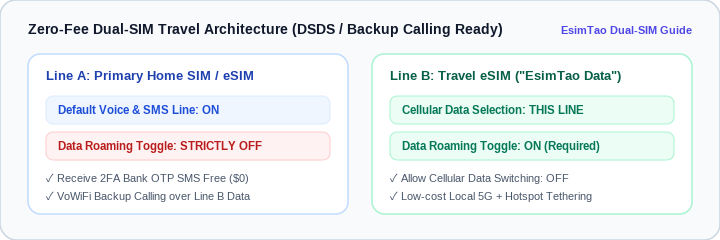
- Label your primary SIM and travel eSIM clearly to prevent accidental roaming data charges.
- Upon arrival at your destination, turn on Data Roaming on the travel eSIM and verify APN settings.
- If encountering no service or 3G only, toggle Airplane Mode or manually select an authorized roaming carrier network.
Consejos clave y optimización
- Never delete the eSIM profile during travel; once deleted, the QR code cannot be scanned again.
- Disable "Allow Cellular Data Switching" to guarantee your primary carrier cannot incur roaming charges.
3. Three Golden Rules for Beginners
- Rule 1 (Single-Use QR): Most travel eSIM QR codes are single-use credentials. Never delete the profile to "restart" it.
- Rule 2 (Pre-Departure Wi-Fi Install): Install your eSIM profile over home Wi-Fi before flying, and enable roaming on arrival.
- Rule 3 (Lock Primary Data): Turn off Data Roaming on your home SIM to prevent unexpected roaming fees.
📡 Cellular Latency Architecture Visualizer
EsimTao Lab Certified
Preguntas frecuentes (FAQ)
P: Can the same eSIM QR code be scanned and installed on multiple devices?
R: No. Most travel eSIM profiles are single-use credentials. Once bound or deleted, they cannot be re-downloaded to another device.
P: How to use travel eSIM on devices without native eSIM support?
R: You can use removable smart physical SIM adapters (such as ESTK, 5ber, or X-eSIM) to write and manage global eSIM profiles via their companion app.
P: When does the travel eSIM validity period start?
R: Validity counts down from the moment your eSIM connects to a supported local network abroad, not when you scan the QR code.
P: Can I install the eSIM before leaving my home country?
R: Yes, install it at home. It will show "No Service" until you land at your destination, which is completely normal.