AndroidスマホにおけるeSIM設定と位置情報ガイド
LPAツールを用いたeSIMプロファイルの書き込みとAndroidの設定方法。
ET
EsimTao Editorial Desk · Telecom & Roaming Lab
✓
Fact-Checked & Field-Tested (2026)
⚡ クイック要点ガイド (TL;DR 重要ポイントまとめ)
LPAツールを用いたeSIMプロファイルの書き込みとAndroidの設定方法。
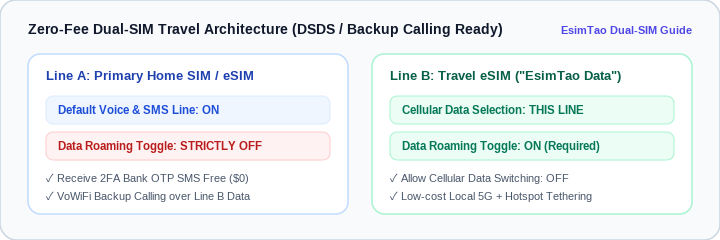
ステップ別インストール&設定ガイド
- 安定したWi-Fi環境下でeSIM QRコードをスキャンし、SM-DP+アドレスとアクティベーションコードを入力します。
- 主回線と海外eSIMにラベルを付け、高額な国際ローミングの誤課金を防ぎます。
- 現地到着後、eSIMのデータローミング(Data Roaming)をONにし、APN設定を確認します。
- 圏外や3G固定になる場合は、手動でネットワークを選択するか機内モードをON/OFFしてください。
注意点とおすすめの最適化
- 旅行前や使用中にeSIMプロファイルを削除しないでください。削除すると再利用できなくなります。
- 「モバイルデータ通信の切替を許可」をOFFにして、主回線での高額ローミング課金を防ぎます。
3. OEM-Specific Android Tweaks (Xiaomi / Huawei / Samsung)
- Xiaomi (HyperOS): Set Battery Saver for Google Play Services to "No Restrictions" to prevent background GPS kills.
- Samsung (One UI): Add travel maps to "Never Sleeping Apps" in Device Care.
- Huawei / Honor: Ensure MicroG location provider has high precision permissions enabled.
4. Arrival Positioning Golden Rule
- On airport exit: Step outdoors into clear sky view for 30 seconds to allow the GPS receiver to download fresh ephemeris data and lock coordinates.
📡 Cellular Latency Architecture Visualizer
EsimTao Lab Certified
よくある質問(FAQ)
Q: 同じeSIM QRコードを複数端末でスキャンして使用できますか?
A: いいえ。ほとんどの旅行用eSIMは1回限りの使い捨て(Single-Use)仕様です。端末から削除すると再利用できません。
Q: eSIM非対応端末(中国版iPhone等)でeSIMを利用する方法はありますか?
A: ESTKや5berなどのスマート物理SIMカードアダプターを使用すれば、物理スロットに挿入してeSIMプロファイルを書き込めます。
Q: Can I install the eSIM on Android before departing?
A: Yes, install it over home Wi-Fi. It stays idle until you touch down abroad and toggle Data Roaming ON.
Q: Why can’t I find local transit apps on Google Play abroad?
A: Your Play Store region is tied to your Google billing country. Use a multi-region account or download verified APKs directly.