Guia de transferência de eSIM 2026: Transferência Rápida iPhone e EID Android
Como transferir perfis eSIM ao troar de celular: Transferência Rápida do iOS, limites de código QR de uso único, reemissão EID Android e recuperação.
⚡ Quick Answer (TL;DR Summary)
Como transferir perfis eSIM ao troar de celular: Transferência Rápida do iOS, limites de código QR de uso único, reemissão EID Android e recuperação.
Guia de instalação passo a passo
- Scan the eSIM QR code on a stable Wi-Fi connection, or manually enter the SM-DP+ Address and Activation Code.
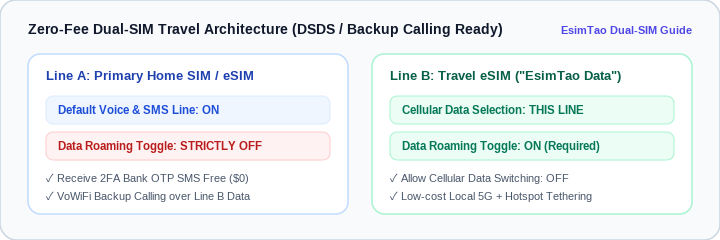
- Label your primary SIM and travel eSIM clearly to prevent accidental roaming data charges.
- Upon arrival at your destination, turn on Data Roaming on the travel eSIM and verify APN settings.
- If encountering no service or 3G only, toggle Airplane Mode or manually select an authorized roaming carrier network.
Dicas essenciais e otimização
- Never delete the eSIM profile during travel; once deleted, the QR code cannot be scanned again.
- Disable "Allow Cellular Data Switching" to guarantee your primary carrier cannot incur roaming charges.
3. What to Do if You Switch Devices Mid-Trip
- Do NOT delete the profile blindly from the old device.
- Contact customer support and provide: 1. Order ID; 2. Current ICCID; 3. Reason for device change.
- Support revokes the old profile and issues a fresh replacement QR code within minutes.
- Scan the new QR code on your replacement phone.
Frequently Asked Questions (FAQ)
Q: Can the same eSIM QR code be scanned and installed on multiple devices?
A: No. Most travel eSIM profiles are single-use credentials. Once bound or deleted, they cannot be re-downloaded to another device.
Q: How to use travel eSIM on devices without native eSIM support?
A: You can use removable smart physical SIM adapters (such as ESTK, 5ber, or X-eSIM) to write and manage global eSIM profiles via their companion app.
Q: Does requesting a replacement QR code cost extra money?
A: For verified travel eSIM customers, emergency QR re-issuance due to device changes is almost always free of charge.
Q: Do I need to reconfigure APN on the new device?
A: Usually no, as APN parameters sync automatically during profile installation. Verify settings if connectivity takes more than a minute.