Hướng dẫn eSIM: Avoid High International Data Roaming Charges: Top 5 Traps
How to block primary SIM background data leaks and automatic data switching.
ET
EsimTao Editorial Desk · Telecom & Roaming Lab
✓
Fact-Checked & Field-Tested (2026)
⚡ Quick Answer (TL;DR Summary)
How to block primary SIM background data leaks and automatic data switching.
Hướng dẫn cài đặt và thiết lập từng bước
- Scan the eSIM QR code on a stable Wi-Fi connection, or manually enter the SM-DP+ Address and Activation Code.
- Label your primary SIM and travel eSIM clearly to prevent accidental roaming data charges.
- Upon arrival at your destination, turn on Data Roaming on the travel eSIM and verify APN settings.
- If encountering no service or 3G only, toggle Airplane Mode or manually select an authorized roaming carrier network.
Lời khuyên quan trọng và tối ưu hóa
- Never delete the eSIM profile during travel; once deleted, the QR code cannot be scanned again.
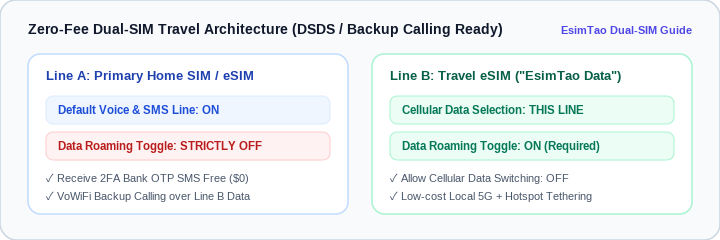
- Disable "Allow Cellular Data Switching" to guarantee your primary carrier cannot incur roaming charges.
3. iPhone vs Android Setup Checklist
- iPhone: Settings > Cellular > Cellular Data (select eSIM, turn OFF Auto Switch) > Primary SIM > Data Roaming OFF.
- Samsung / Pixel: Settings > Connections > SIM Manager > Primary Mobile Data set to eSIM, Data Roaming OFF on Home SIM.
- Xiaomi / OnePlus: Dual SIM settings > Default Internet SIM set to eSIM, disable "Smart Dual SIM Data Switch".
📡 Cellular Latency Architecture Visualizer
EsimTao Lab Certified
Frequently Asked Questions (FAQ)
Q: Can the same eSIM QR code be scanned and installed on multiple devices?
A: No. Most travel eSIM profiles are single-use credentials. Once bound or deleted, they cannot be re-downloaded to another device.
Q: How to use travel eSIM on devices without native eSIM support?
A: You can use removable smart physical SIM adapters (such as ESTK, 5ber, or X-eSIM) to write and manage global eSIM profiles via their companion app.
Q: Does answering spam calls abroad incur roaming charges?
A: Yes, on traditional cellular roaming answering incoming calls costs standard per-minute international rates. Decline unknown calls immediately.
Q: How do I restore normal settings after returning home?
A: Simply switch Cellular Data back to your Primary SIM and turn off the Travel eSIM line.
Related Guides & Keep-Alive Strategies
📖 Deep Dive: How iOS Enables Overseas Wi-Fi Calling (WLoc, UDP 500/4500 & Transparent Gateway)
📖 Hướng dẫn từng bước cài đặt và kích hoạt eSIM an toàn
📖 Hướng dẫn eSIM: No Signal or Internet? 3-Step Emergency Troubleshoot Guide
📖 Hướng dẫn eSIM: Mainland High-Volume Roaming Recommendations (esim.cc / BNESIM)