Hướng dẫn kết hợp SIM giữ số và eSIM du lịch tốt nhất 2026
Một SIM vật lý giá rẻ để giữ số và nhận mã OTP ngân hàng miễn phí, kết hợp một eSIM du lịch để có data địa phương giá tốt.
ET
EsimTao Editorial Desk · Telecom & Roaming Lab
✓
Fact-Checked & Field-Tested (2026)
⚡ Quick Answer (TL;DR Summary)
Một SIM vật lý giá rẻ để giữ số và nhận mã OTP ngân hàng miễn phí, kết hợp một eSIM du lịch để có data địa phương giá tốt.
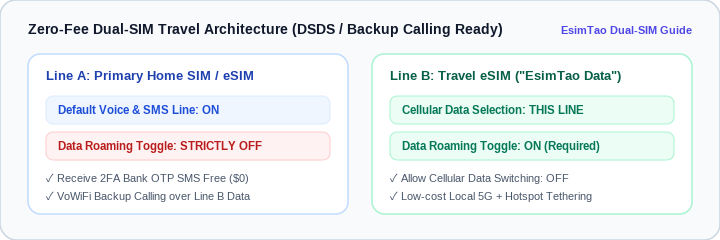
Hướng dẫn cài đặt và thiết lập từng bước
- Scan the eSIM QR code on a stable Wi-Fi connection, or manually enter the SM-DP+ Address and Activation Code.
- Label your primary SIM and travel eSIM clearly to prevent accidental roaming data charges.
- Upon arrival at your destination, turn on Data Roaming on the travel eSIM and verify APN settings.
- If encountering no service or 3G only, toggle Airplane Mode or manually select an authorized roaming carrier network.
Lời khuyên quan trọng và tối ưu hóa
- Never delete the eSIM profile during travel; once deleted, the QR code cannot be scanned again.
- Disable "Allow Cellular Data Switching" to guarantee your primary carrier cannot incur roaming charges.
📡 Cellular Latency Architecture Visualizer
EsimTao Lab Certified
Frequently Asked Questions (FAQ)
Q: Can the same eSIM QR code be scanned and installed on multiple devices?
A: No. Most travel eSIM profiles are single-use credentials. Once bound or deleted, they cannot be re-downloaded to another device.
Q: How to use travel eSIM on devices without native eSIM support?
A: You can use removable smart physical SIM adapters (such as ESTK, 5ber, or X-eSIM) to write and manage global eSIM profiles via their companion app.