Гид по eSIM в Южной Корее 2026: SKT, KT, LG U+ 5G и карта T-Money
Сравнение eSIM для Южной Кореи 2026: покрытие 5G операторов SKT, KT и LG U+, регистрация KYC по паспорту, интеграция T-Money и расчет трафика.
⚡ Quick Answer (TL;DR Summary)
Сравнение eSIM для Южной Кореи 2026: покрытие 5G операторов SKT, KT и LG U+, регистрация KYC по паспорту, интеграция T-Money и расчет трафика.
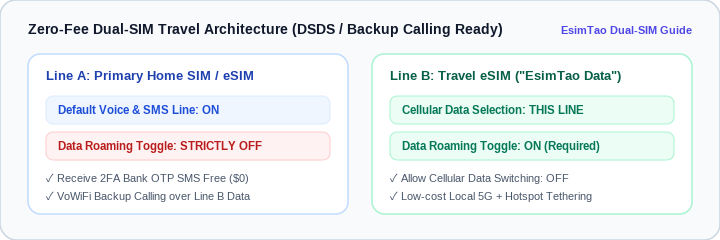
Пошаговая установка и настройка
- Scan the eSIM QR code on a stable Wi-Fi connection, or manually enter the SM-DP+ Address and Activation Code.
- Label your primary SIM and travel eSIM clearly to prevent accidental roaming data charges.
- Upon arrival at your destination, turn on Data Roaming on the travel eSIM and verify APN settings.
- If encountering no service or 3G only, toggle Airplane Mode or manually select an authorized roaming carrier network.
Ключевые советы и оптимизация
- Never delete the eSIM profile during travel; once deleted, the QR code cannot be scanned again.
- Disable "Allow Cellular Data Switching" to guarantee your primary carrier cannot incur roaming charges.
3. Arrival Activation at Incheon Airport & APN Setup
- Scan the QR code in your confirmation email while on stable Wi-Fi before departure.
- Upon landing at Incheon (ICN) or Gimpo (GMP) airport, turn on the eSIM line and enable Data Roaming.
- Confirm the network registers with SKT or KT automatically. If offline, manually verify APN (e.g., ltemobile.apn or internet.sktelecom.com).
- For public transit, use Apple Pay transit integrations or purchase a physical T-Money card at convenience stores.
4. Essential Travel Tips: Navigation & KYC Rules
- Mapping Note: Due to South Korean security laws, Google Maps offers limited walking navigation. We strongly recommend downloading Naver Map (multi-language support) or KakaoMap prior to departure.
- KYC Policy: Local outbound calling/SMS packages require statutory passport upload; data-only packages are completely passport-free.
Frequently Asked Questions (FAQ)
Q: Can the same eSIM QR code be scanned and installed on multiple devices?
A: No. Most travel eSIM profiles are single-use credentials. Once bound or deleted, they cannot be re-downloaded to another device.
Q: How to use travel eSIM on devices without native eSIM support?
A: You can use removable smart physical SIM adapters (such as ESTK, 5ber, or X-eSIM) to write and manage global eSIM profiles via their companion app.
Q: What should I do if my phone shows No Service on arrival?
A: Go to Settings > Cellular > Network Selection, turn off Automatic, and manually pick SKT or KT. Toggle Airplane Mode for 5 seconds to reconnect.
Q: Does Chinese dual-SIM iPhone support Korea eSIM?
A: Mainland China iPhones lack hardware eSIM support. Use an adapter (5ber/eSTK) or a compatible hotspot device.