Гид по eSIM: Canada Fizz eSIM Setup & Keep-Alive Guide: QC Address, Referral Code XWTWI & Plan Customization
Complete walkthrough for getting a Canada +1 number with Fizz eSIM. Learn how to select QC address to avoid roaming issues, apply referral code XWTWI for up to $50 CAD bonus, install via email/app, and lower plan to ~$7 CAD/month for keepalive.
⚡ Quick Answer (TL;DR Summary)
Complete walkthrough for getting a Canada +1 number with Fizz eSIM. Learn how to select QC address to avoid roaming issues, apply referral code XWTWI for up to $50 CAD bonus, install via email/app, and lower plan to ~$7 CAD/month for keepalive.
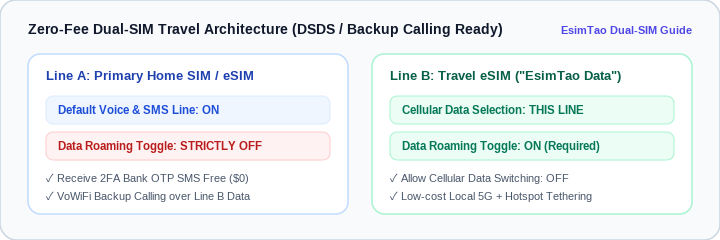
Пошаговая установка и настройка
- Scan the eSIM QR code on a stable Wi-Fi connection, or manually enter the SM-DP+ Address and Activation Code.
- Label your primary SIM and travel eSIM clearly to prevent accidental roaming data charges.
- Upon arrival at your destination, turn on Data Roaming on the travel eSIM and verify APN settings.
- If encountering no service or 3G only, toggle Airplane Mode or manually select an authorized roaming carrier network.
Ключевые советы и оптимизация
- Never delete the eSIM profile during travel; once deleted, the QR code cannot be scanned again.
- Disable "Allow Cellular Data Switching" to guarantee your primary carrier cannot incur roaming charges.
Authentic +1 Canadian Physical Number & Banking 2FA Trust
- Carrier-Grade Number Allocation: Fizz provisions native Canadian mobile lines across major area codes (Montreal, Quebec City, Ottawa, Toronto, Vancouver).
- Full Banking Compatibility: Passes two-factor authentication (2FA) seamlessly with all Big Five Canadian banks (RBC, TD, Scotiabank, BMO, CIBC), Wealthsimple, EQ Bank, and the Canada Revenue Agency (CRA).
- Wi-Fi Calling Enabled: Make and receive domestic Canadian calls and SMS over Wi-Fi when traveling outside North America or inside signal blind spots.
Instant Online Purchase & eSIM Installation Steps
- Visit the official website (fizz.ca) and build your customized mobile plan.
- Select "eSIM" during the checkout process for immediate digital delivery without waiting for postal mail.
- Scan the displayed QR code on your eSIM-compatible handset or manually copy the activation code into your cellular settings.
- Confirm the Mobile Data APN is set to "sp.fizz.ca" and toggle VoLTE and Wi-Fi Calling to active.
Fizz Network Coverage & EXT Partner Rules
- Fizz vs. Fizz EXT: Connects natively to Fizz/Videotron cell towers in Quebec and the National Capital Region. When traveling across Ontario, Alberta, or BC, devices automatically connect to "Fizz EXT" via Rogers, Bell, or Telus.
- Partner Fair Use Policy: Ensure the majority of your usage over three consecutive months originates within the primary Fizz subscription area rather than exclusively on partner EXT towers.
5. Benchmark Comparison: Global Keep-Alive eSIM Cards Matrix
| eSIM / Carrier | Country Code | Keep-Alive Mechanism | Monthly Fee | KYC Rule |
|---|---|---|---|---|
| US Tello Mobile | United States (+1) | $5/month minimum active plan with native Wi-Fi Calling | $5.00 / month | Digital Payment Validation |
| US Ultra Mobile PayGo | United States (+1) | $3/month ($36/year) automatic renewal with 100 free SMS/min via Wi-Fi Calling | $3.00 / month | US Address Registration |
| UK Giffgaff | United Kingdom (+44) | Send 1 SMS / outbound usage every 180 days | Zero monthly fee | Zero-KYC |
Frequently Asked Questions (FAQ)
Q: Can the same eSIM QR code be scanned and installed on multiple devices?
A: No. Most travel eSIM profiles are single-use credentials. Once bound or deleted, they cannot be re-downloaded to another device.
Q: How to use travel eSIM on devices without native eSIM support?
A: You can use removable smart physical SIM adapters (such as ESTK, 5ber, or X-eSIM) to write and manage global eSIM profiles via their companion app.
Q: Can I activate Fizz eSIM while outside of Canada?
A: Fizz recommends initial activation while within Canada or the US. However, activation over a strong Wi-Fi network from abroad is technically supported.
Q: What is the correct APN for Fizz Mobile?
A: The official cellular APN is "sp.fizz.ca". On modern iOS and Android devices, this APN is configured automatically upon downloading the eSIM profile.
Q: How do I transfer my Fizz eSIM to a replacement device?
A: Log in to your Fizz dashboard, navigate to "Manage plan -> Change SIM card -> eSIM", and generate a brand-new QR code for the new smartphone.